> ## Documentation Index
> Fetch the complete documentation index at: https://docs.xano.com/llms.txt
> Use this file to discover all available pages before exploring further.
# Environment Variables
# Environment Variables
> Variables that are available across your entire workspace
## What are environment variables?
Environment variables are persistent variables that are available across your entire workspace. Typically, these are used to store things like external API keys or other sensitive information that you need to use across multiple function stacks, without storing it in a database table.
Environment variables can be read in any logic or workflow, but they can not be modified from anywhere but this settings panel, so it's best to only use them for things that you don't need to change often.
## Adding Environment Variables
Click the icon in the upper-right corner to open **Settings**.
On the next screen, click 'Manage' to edit your environment variables.
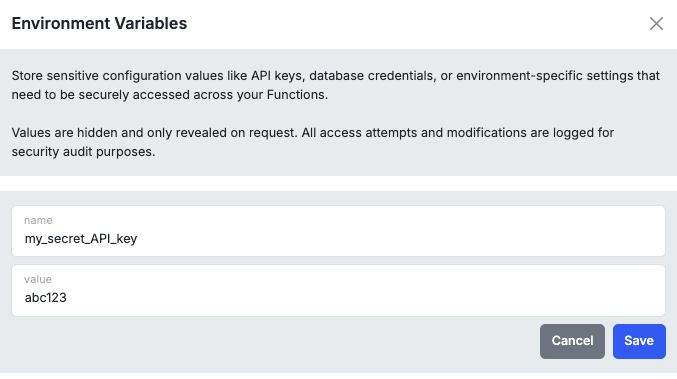
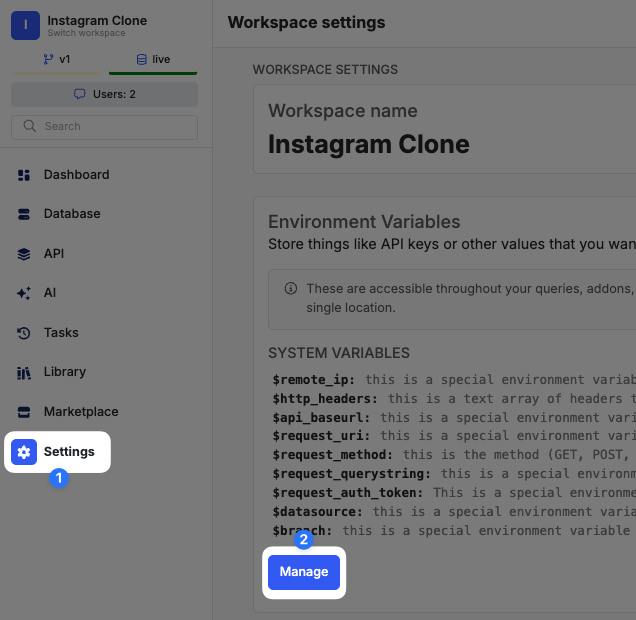 Click '+ Add Variable' at the bottom of the panel that opens to add a new variable.
Give your environment variable a name that you can easily recognize; this is how you'll identify it when calling it in function stacks. Then, supply the value.
Click '+ Add Variable' at the bottom of the panel that opens to add a new variable.
Give your environment variable a name that you can easily recognize; this is how you'll identify it when calling it in function stacks. Then, supply the value.
 ## Using Environment Variables
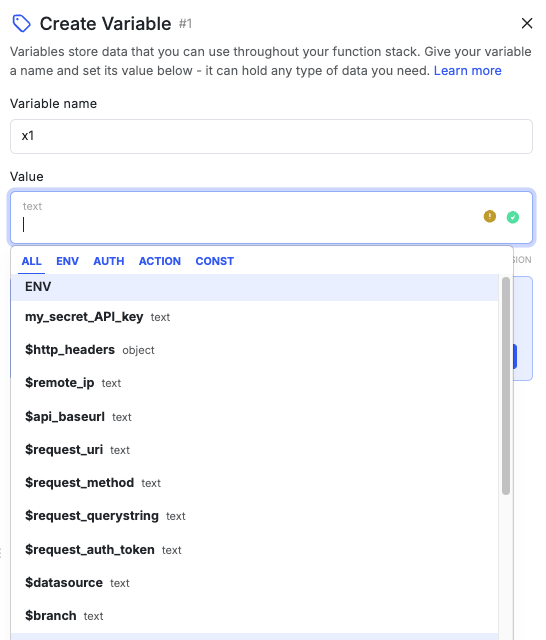
Environment variables are available in any logic or workflow from a value dropdown under **ENV**.
## Using Environment Variables
Environment variables are available in any logic or workflow from a value dropdown under **ENV**.
 ## Xano-generated Environment Variables
Xano maintains several environment variables you can use.
| Variable | Description |
| ---------------------- | ---------------------------------------------------------------------------- |
| `$remote_ip` | Resolves to the IP address of the individual accessing the API endpoint. |
| `$http_headers` | A text array of headers that are sent to the API endpoint. |
| `$api_baseurl` | Contains the base URL of the active endpoint. |
| `$request_uri` | Contains the URI being accessed from the API. |
| `$request_method` | The HTTP method (`GET`, `POST`, `DELETE`, etc.) of the incoming API request. |
| `$request_querystring` | Contains the query string of the URI being accessed from the API. |
| `$request_auth_token` | Contains the authorization token of the API request. |
| `$datasource` | Indicates which datasource is being used. |
| `$branch` | Indicates which branch is being used. |
***
> To find navigation and other pages in this documentation, fetch the llms.txt file at: [https://docs.xano.com/llms.txt](https://docs.xano.com/llms.txt)
## Xano-generated Environment Variables
Xano maintains several environment variables you can use.
| Variable | Description |
| ---------------------- | ---------------------------------------------------------------------------- |
| `$remote_ip` | Resolves to the IP address of the individual accessing the API endpoint. |
| `$http_headers` | A text array of headers that are sent to the API endpoint. |
| `$api_baseurl` | Contains the base URL of the active endpoint. |
| `$request_uri` | Contains the URI being accessed from the API. |
| `$request_method` | The HTTP method (`GET`, `POST`, `DELETE`, etc.) of the incoming API request. |
| `$request_querystring` | Contains the query string of the URI being accessed from the API. |
| `$request_auth_token` | Contains the authorization token of the API request. |
| `$datasource` | Indicates which datasource is being used. |
| `$branch` | Indicates which branch is being used. |
***
> To find navigation and other pages in this documentation, fetch the llms.txt file at: [https://docs.xano.com/llms.txt](https://docs.xano.com/llms.txt)