> ## Documentation Index
> Fetch the complete documentation index at: https://docs.xano.com/llms.txt
> Use this file to discover all available pages before exploring further.
# Xano Agent
> Build your entire backend with a single prompt using the AI-powered Xano Agent
Xano Agent is an AI assistant built into Xano that can create, modify, and manage your backend through natural language. Describe what you want — database tables, API endpoints, middleware, functions — and Xano Agent builds it for you in XanoScript, ready to review and publish.
Everything Xano Agent creates is standard Xano — you can open it in the [visual editor](/building/visually), edit it as [XanoScript in your IDE](/xano-cli/get-started), or refine it with the [AI assistants](/building/with-ai). These are all different ways to work with the same underlying resources, so you're never locked into one approach.
**Looking for AI Agents you can build and deploy as part of your backend?** See [AI Agents](/ai-tools/agents) instead.
## How it works
Xano Agent operates directly inside your workspace. You chat with it, it proposes a plan, writes the XanoScript, and presents the changes for your review before anything goes live.
Open Xano Agent from inside your workspace. You'll see a chat interface with a file browser on the left showing your workspace contents.
Type a prompt describing your backend requirements. Xano Agent works best with detailed, specific requests. For example:
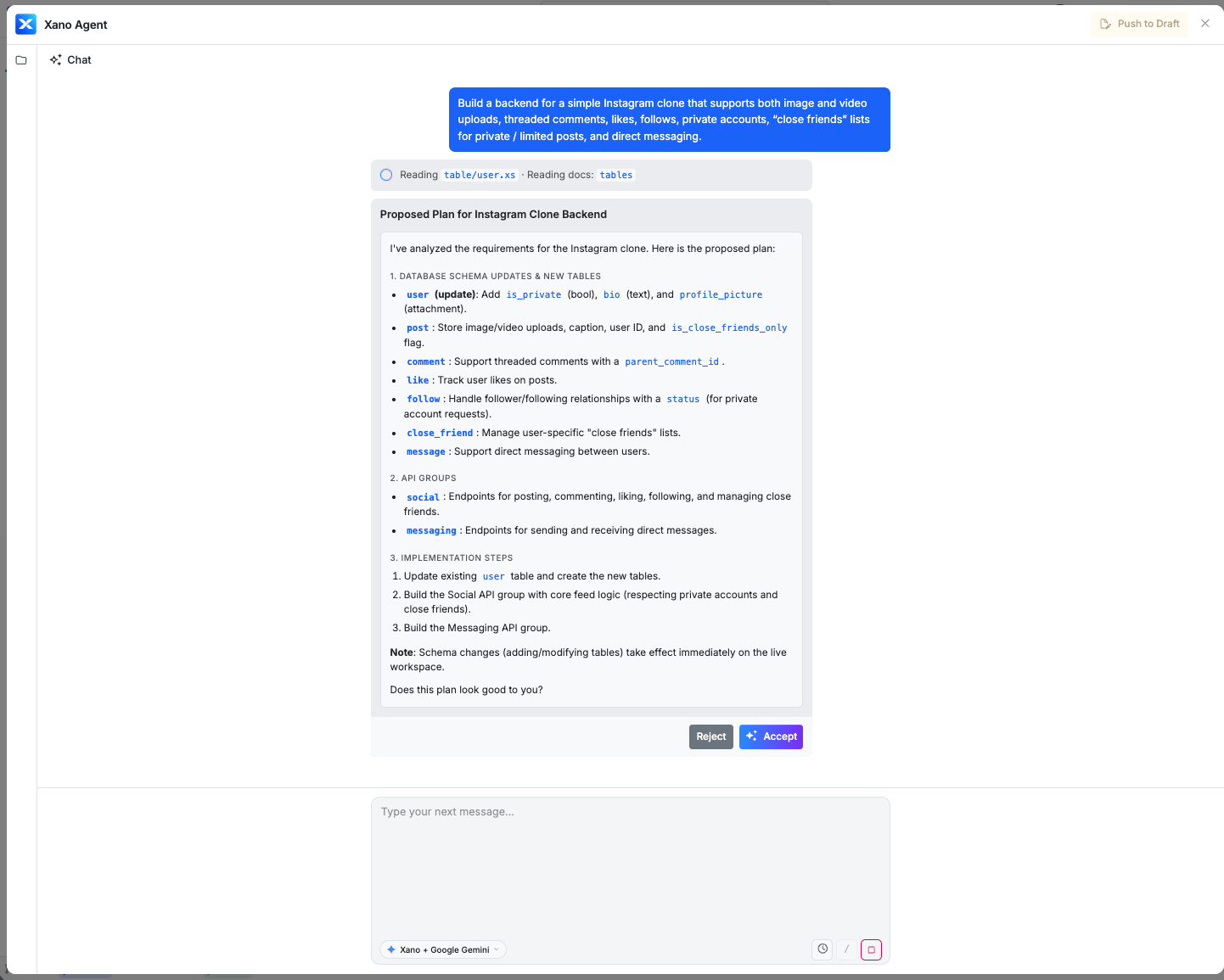
> Build a backend for a simple Instagram clone that supports both image and video uploads, threaded comments, likes, follows, private accounts, "close friends" lists for private / limited posts, and direct messaging.
Xano Agent will analyze your request and present a proposed plan — including the database schema, API groups, and endpoints it intends to create.
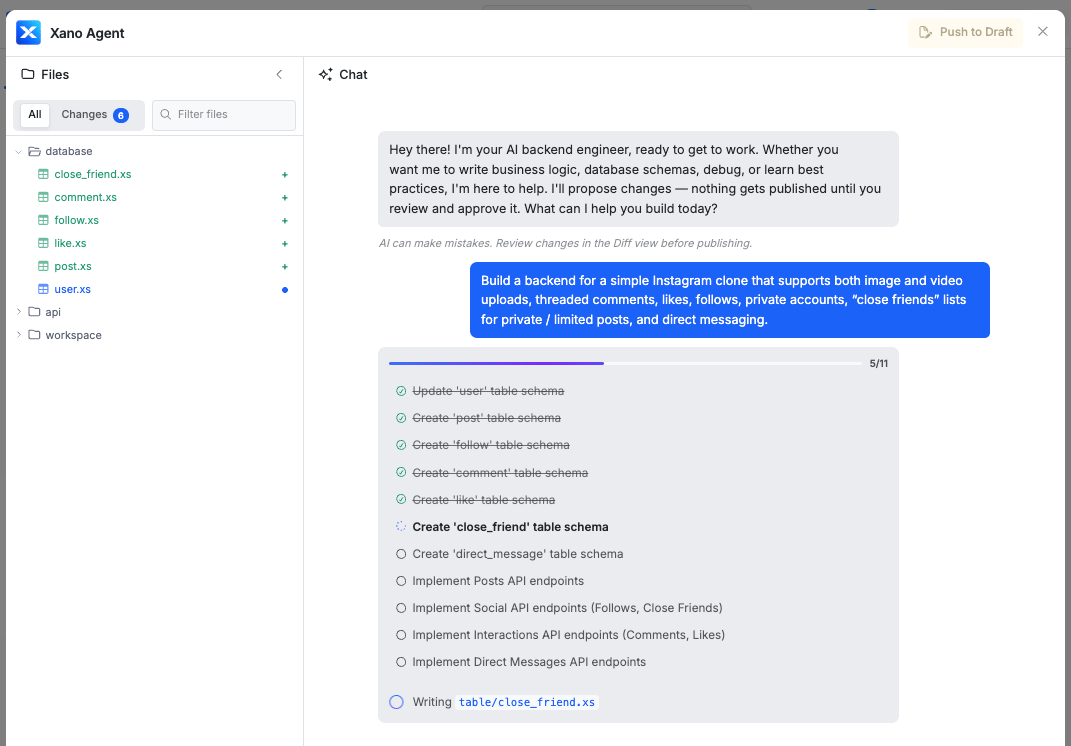
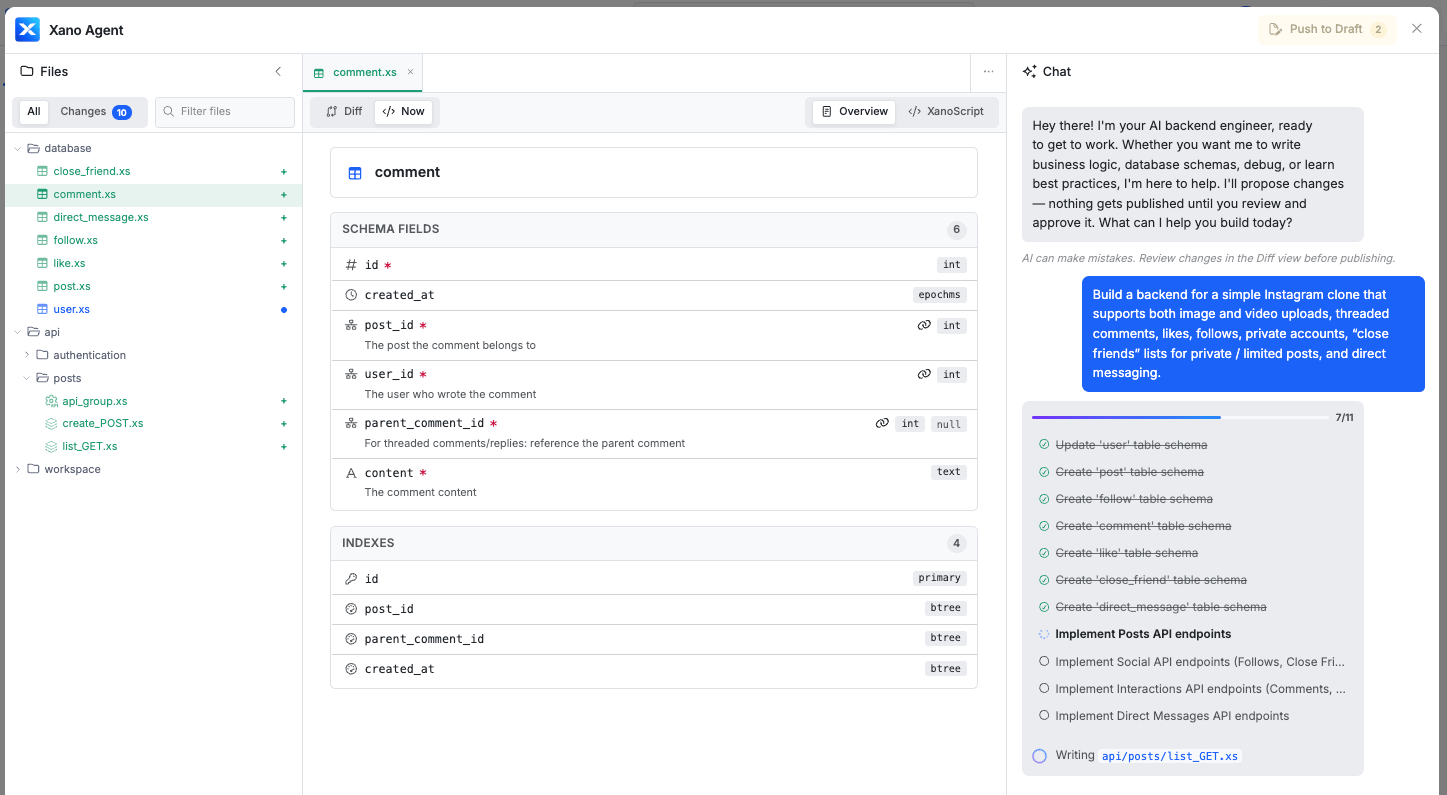
 As Xano Agent builds, you can view the generated XanoScript in the code editor. The file browser updates in real-time as new tables, APIs, and other resources are created.
Toggle between **Summary** and **XanoScript** views to inspect the logic from different angles.
As Xano Agent builds, you can view the generated XanoScript in the code editor. The file browser updates in real-time as new tables, APIs, and other resources are created.
Toggle between **Summary** and **XanoScript** views to inspect the logic from different angles.
 If you're using the Agent to make modifications to something instead of starting fresh, you'll also be able to take advantage of the Diff view to see the changes easily.
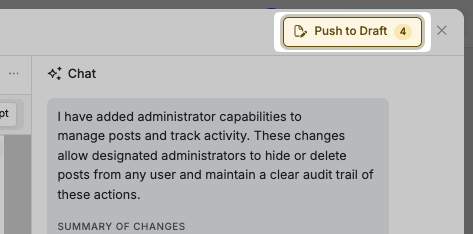
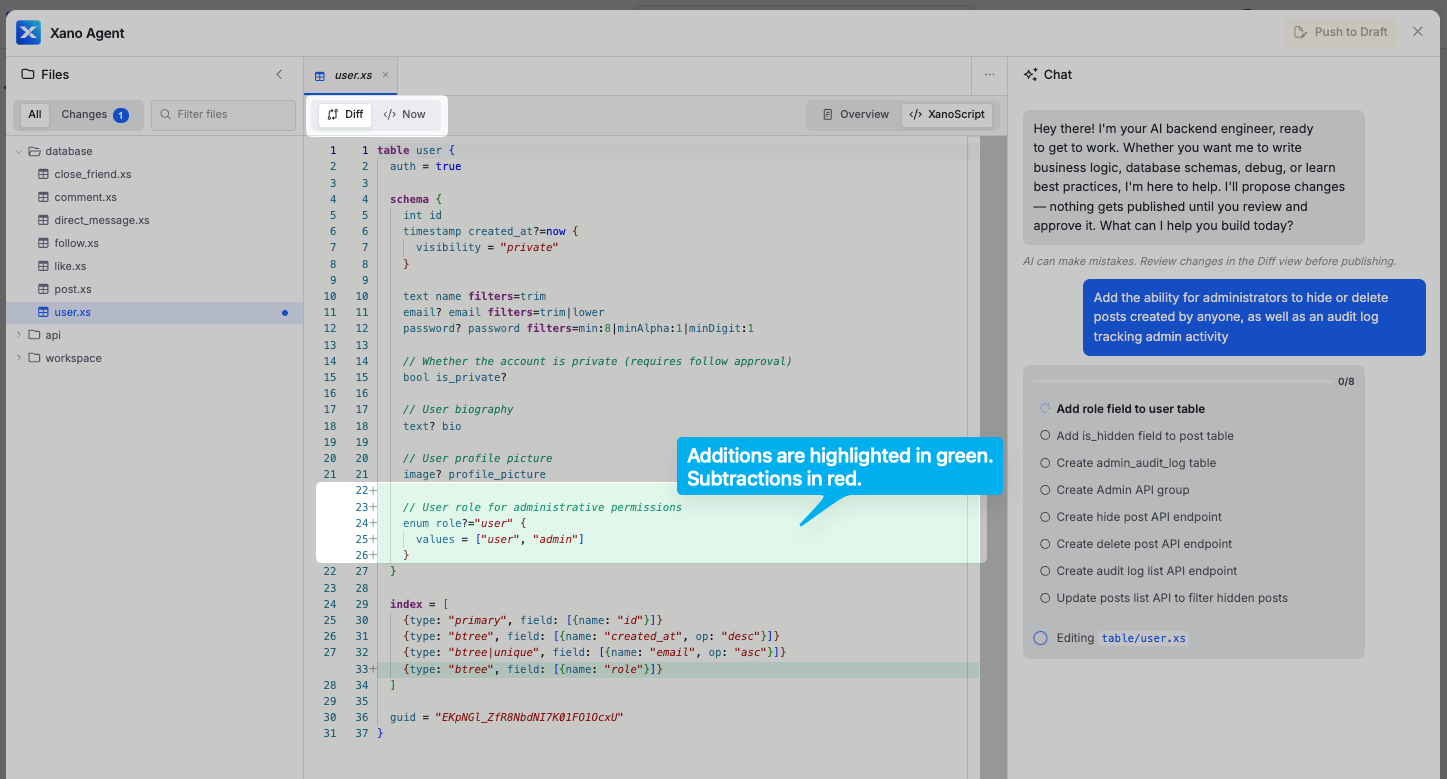 Click **Push to Draft** once you're ready to apply the changes the Agent built to your workspace. You can always continue the conversation now to iterate, or come back to it later.
 ## Publishing
When you're satisfied with what you have built using the Xano Agent, click **Push to Draft** to stage your changes.
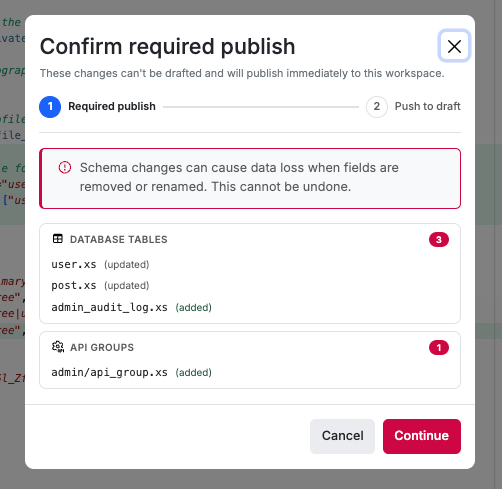
Sometimes, you may be asked to **Confirm required publish** for items that don't support draft states. Currently, this includes:
* Database tables
* API groups
Xano will show you exactly which items will be published directly so there are no surprises.
## Publishing
When you're satisfied with what you have built using the Xano Agent, click **Push to Draft** to stage your changes.
Sometimes, you may be asked to **Confirm required publish** for items that don't support draft states. Currently, this includes:
* Database tables
* API groups
Xano will show you exactly which items will be published directly so there are no surprises.
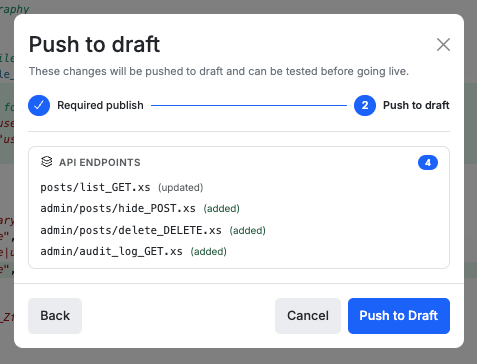
 For the rest, it will be pushed to a draft state for you to publish whenever you're ready.
 ## What Xano Agent can build
Xano Agent has full access to your workspace and can create or modify:
* **Database tables** — schema design, field types, relationships, and indexes
* **API endpoints** — full CRUD, authentication, input validation, and custom logic
* **Custom functions** — reusable logic blocks
* **Middleware** — authentication checks, rate limiting, request preprocessing
* **Background tasks** — scheduled or event-driven workflows
## Tips for effective prompts
* **Be specific** — include field names, data types, relationships, and business rules when possible.
* **Describe the domain** — a sentence of context about your app helps Xano Agent make better schema decisions.
* **Iterate** — start with a broad request, review the output, then ask for refinements in follow-up messages.
* **Reference existing resources** — if you already have tables or APIs, mention them so Xano Agent builds on top of what's there.
## Other ways to build in Xano
Xano Agent is one of several ways to build your backend. They all produce the same output and work with the same resources — pick whichever fits the task at hand, or combine them.
| | Xano Agent | [Visual editor](/building/visually) | [AI Assistants](/building/with-ai) | [CLI + IDE](/xano-cli/get-started) |
| --------------- | ---------------------------------------------------- | ----------------------------------- | ------------------------------------------------ | ----------------------------------- |
| **Where** | Inside Xano | Inside Xano | Inside Xano | Local IDE (VS Code, Cursor, etc.) |
| **Scope** | Full workspace — tables, APIs, functions, middleware | Full workspace | Individual features (logic, database, SQL, etc.) | Full workspace via XanoScript files |
| **Interaction** | Chat-based, multi-step | Point-and-click | Single-purpose per assistant | AI agent writes `.xs` files locally |
| **Review flow** | Built-in diff view + push to draft | Live editing | Inline suggestions | Git diff + CLI push |
## What Xano Agent can build
Xano Agent has full access to your workspace and can create or modify:
* **Database tables** — schema design, field types, relationships, and indexes
* **API endpoints** — full CRUD, authentication, input validation, and custom logic
* **Custom functions** — reusable logic blocks
* **Middleware** — authentication checks, rate limiting, request preprocessing
* **Background tasks** — scheduled or event-driven workflows
## Tips for effective prompts
* **Be specific** — include field names, data types, relationships, and business rules when possible.
* **Describe the domain** — a sentence of context about your app helps Xano Agent make better schema decisions.
* **Iterate** — start with a broad request, review the output, then ask for refinements in follow-up messages.
* **Reference existing resources** — if you already have tables or APIs, mention them so Xano Agent builds on top of what's there.
## Other ways to build in Xano
Xano Agent is one of several ways to build your backend. They all produce the same output and work with the same resources — pick whichever fits the task at hand, or combine them.
| | Xano Agent | [Visual editor](/building/visually) | [AI Assistants](/building/with-ai) | [CLI + IDE](/xano-cli/get-started) |
| --------------- | ---------------------------------------------------- | ----------------------------------- | ------------------------------------------------ | ----------------------------------- |
| **Where** | Inside Xano | Inside Xano | Inside Xano | Local IDE (VS Code, Cursor, etc.) |
| **Scope** | Full workspace — tables, APIs, functions, middleware | Full workspace | Individual features (logic, database, SQL, etc.) | Full workspace via XanoScript files |
| **Interaction** | Chat-based, multi-step | Point-and-click | Single-purpose per assistant | AI agent writes `.xs` files locally |
| **Review flow** | Built-in diff view + push to draft | Live editing | Inline suggestions | Git diff + CLI push |