> ## Documentation Index
> Fetch the complete documentation index at: https://docs.xano.com/llms.txt
> Use this file to discover all available pages before exploring further.
# Managing Data Schema & Records
> Learn how to pull, push, and protect your database schema and records with the Xano CLI
export const BrowserFrame = props => {
const {url = "xano.run", maxWidth = 820, className = "", lightSrc, darkSrc, alt = "", children} = props || ({});
const style = typeof maxWidth === "number" ? {
maxWidth: `${maxWidth}px`,
margin: "16px 0"
} : {
maxWidth,
margin: "16px 0"
};
const hasSwapImages = Boolean(lightSrc && darkSrc);
return
{hasSwapImages ? <>


: children}
;
};
By default, the CLI operates on your workspace's **schema and logic** — tables, functions, APIs, and tasks — without touching your database records. You can opt in to including records explicitly with the `--records` flag.
***
## Schema Changes and Data Impact
Pushing XanoScript that modifies table structure can have irreversible effects on your data. The [push preview](/xano-cli/push-pull#push-preview) classifies every operation before you confirm — here's what each one means:
### Tables
| Operation | Preview label | What happens |
| --------------- | ---------------------------- | ------------------------------------------------------------------ |
| Add a new table | `CREATE` | Safe — a new empty table is created |
| Rename a table | `UPDATE` | The table is renamed; any references using the old name will break |
| Delete a table | `DELETE` or `CASCADE_DELETE` | The table and all its records are permanently removed |
### Columns
| Operation | Preview label | What happens |
| ------------------- | -------------- | ---------------------------------------------------------------- |
| Add a column | `ADD_FIELD` | Safe — existing rows get the default value |
| Rename a column | `UPDATE_FIELD` | Data moves to the new name; queries using the old name break |
| Change a field type | `ALTER_FIELD` | Data may be cast, truncated, or lost depending on the conversion |
| Remove a column | `DROP_FIELD` | All data in that column is permanently deleted |
Destructive operations — `DELETE`, `CASCADE_DELETE`, `DROP_FIELD`, and `ALTER_FIELD` — are called out separately in the push preview so they're easy to spot before confirming.
Work on a [non-live branch](/xano-cli/workspaces-and-branches#create-a-branch) or a **secondary workspace** when making schema changes, and promote to live only after verifying the results.
***
## Pull Records
Pull your table records alongside the schema:
```bash theme={null}
xano workspace pull -d ./my-workspace-data --records
```
Record files are written alongside each table's schema file. This is also the fastest way to create a **local backup** of your data before making schema changes.
***
## Push Records
Records are **off by default** on push. To include them, you must have first pulled with `--records` (so the data exists locally), then explicitly pass `--records` on push:
```bash theme={null}
xano workspace pull -d ./my-workspace-data --records
# ... make changes ...
xano workspace push -d ./my-workspace-data --records
```
Pushing records overwrites the corresponding table data in your Xano workspace. Make sure you're targeting the right branch and workspace before confirming.
***
## Snapshot Your Data Before Schema Changes
Before pushing any changes that alter table structure — removing or renaming columns, changing field types — pull a local copy of your records first:
```bash theme={null}
xano workspace pull -d ./my-workspace-data --records
```
This gives you a local snapshot you can push back if something goes wrong. Pair this with `git commit` before pushing so you have a known-good restore point for both schema and data.
***
## Truncate Records Before Importing
Use `--truncate` to wipe all existing rows from every table before importing records from your local files. This is useful when resetting a staging or test workspace to a known dataset:
```bash theme={null}
xano workspace push -d ./my-workspace-data --records --truncate
```
`--truncate` deletes **all existing table records** before importing. Use this on **staging and test workspaces only** — never against a production workspace. The push preview always lists truncation under Destructive Operations so you can verify before confirming.
***
## Deletions and the `--delete` Flag
By default, the CLI **never deletes objects or records** from your Xano workspace that aren't present in your local files. Objects removed locally are simply ignored during a push — your Xano workspace keeps them as-is.
To delete objects from Xano that don't exist locally, you must explicitly pass `--delete`:
```bash theme={null}
xano workspace push -d ./my-workspace --sync --delete
```
`--delete` requires `--sync` because deletion only applies during a full push — it removes remote objects that are not present in the local files being sent.
Never add `--delete` unless you fully intend to remove objects from your workspace. If you're using an AI assistant to generate or run CLI commands, double-check that it hasn't added this flag on its own — it can happen. Review your command before running it, and always check the push preview for any `DELETE` or `CASCADE_DELETE` operations before confirming.
If you're unsure whether `--delete` ended up in a command, `git diff` will show you any changes to local files, and the push preview will clearly list any objects marked for deletion before you confirm.
***
## Reviewing Your Push
Every `xano workspace push` automatically runs a preview before making any changes. It shows exactly what will be created, updated, or deleted — and calls out destructive operations like `DROP_FIELD`, `ALTER_FIELD`, and `TRUNCATE` separately so they're hard to miss.
To see the preview without pushing, use `--dry-run`:
```bash theme={null}
xano workspace push -d ./my-workspace --dry-run
```
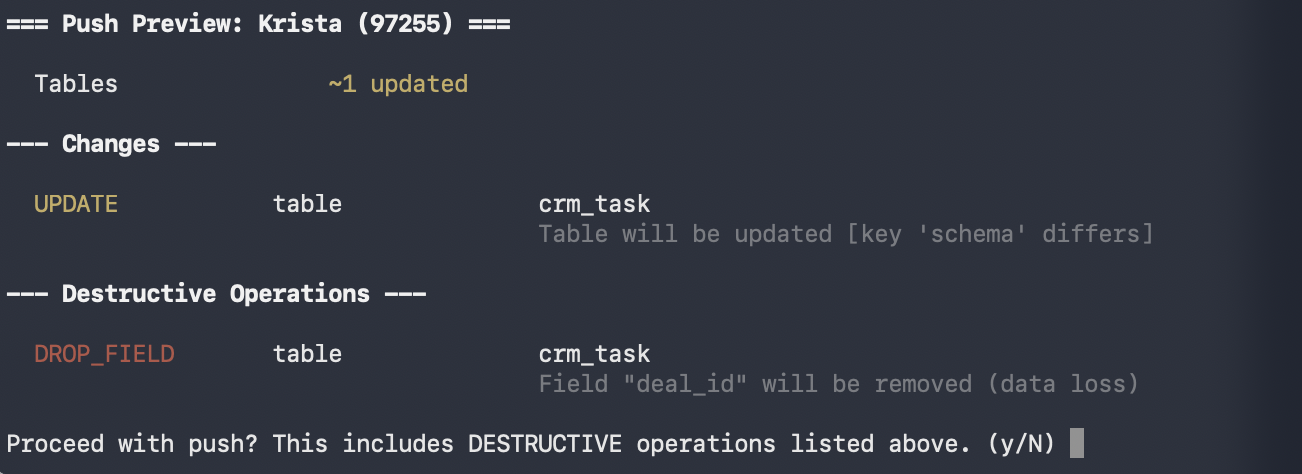 Review this output carefully before confirming, especially any schema changes that could affect existing data. See [Push Preview](/xano-cli/push-pull#push-preview) for the full breakdown of what each section means.
***
## Use Git to Protect Your Work
Your local XanoScript files are plain files on disk — treat them like production infrastructure code and use Git to track every change:
* **Initialize a Git repository** in your workspace directory so every change is tracked.
* **Review diffs before pushing** — run `git diff` (or use your IDE's source control panel) to inspect exactly what has changed since your last push. Pay close attention to table schema files.
* **Commit before pushing** — create a Git commit before running `xano workspace push` so you have a known-good snapshot to revert to if something goes wrong.
* **Snapshot your data** — pull with `--records` before any schema change so you have a local copy of your data you can restore from if needed.
***
## Xano Backups
Xano maintains rolling backups of your instance on all paid plans, independent of anything you do locally. See [Backup and Restore](xano-features/instance-settings/backup-and-restore) for details.
Review this output carefully before confirming, especially any schema changes that could affect existing data. See [Push Preview](/xano-cli/push-pull#push-preview) for the full breakdown of what each section means.
***
## Use Git to Protect Your Work
Your local XanoScript files are plain files on disk — treat them like production infrastructure code and use Git to track every change:
* **Initialize a Git repository** in your workspace directory so every change is tracked.
* **Review diffs before pushing** — run `git diff` (or use your IDE's source control panel) to inspect exactly what has changed since your last push. Pay close attention to table schema files.
* **Commit before pushing** — create a Git commit before running `xano workspace push` so you have a known-good snapshot to revert to if something goes wrong.
* **Snapshot your data** — pull with `--records` before any schema change so you have a local copy of your data you can restore from if needed.
***
## Xano Backups
Xano maintains rolling backups of your instance on all paid plans, independent of anything you do locally. See [Backup and Restore](xano-features/instance-settings/backup-and-restore) for details.