> ## Documentation Index
> Fetch the complete documentation index at: https://docs.xano.com/llms.txt
> Use this file to discover all available pages before exploring further.
# Conditionals
### Conditional If/Then/Else Statement
```javascript theme={null}
conditional {
if (`conditions`) {
// XanoScript statements go here
}
else {
// XanoScript statements go here
}
}
```
| Parameter | Purpose | Example | | |
| ---------- | ----------------------------------------------------------- | ---------------------- | - | ---------- |
| conditions | This is where the condition(s) you want to check will live. | \`"a" == 1 && "b" == 2 | | "c" == 3\` |
```javascript theme={null}
conditional {
if (`"a" == 1 && "b" == 2 || "c" == 3`) {
util.sleep {
value = 3
}
}
else {
util.sleep {
value = 30
}
}
}
```
### Using Variables in Conditions
You can use variables in your conditional expressions:
```javascript theme={null}
var $user_age {
value = 21
}
conditional {
if (`$user_age >= 18`) {
debug.log {
value = "User is an adult"
}
}
else {
debug.log {
value = "User is a minor"
}
}
}
```
### Nested Conditionals
XanoScript supports `elseif` for multi-branch logic. You can use `if`, one or more `elseif`, and an optional `else` block within a `conditional` statement.
```javascript theme={null}
var $score {
value = 85
}
conditional {
if (`$score >= 90`) {
debug.log {
value = "Grade: A"
}
}
elseif (`$score >= 80`) {
debug.log {
value = "Grade: B"
}
}
else {
debug.log {
value = "Grade: C or below"
}
}
}
```
You can use one `if`, zero or more `elseif`, and an optional `else` block in a `conditional` statement. For more than two branches, prefer `elseif` over nested conditionals for clarity.
***
## Switch/Case Statements in XanoScript
XanoScript supports `switch` statements for multi-branch logic. Each `switch` can have multiple `case` blocks and an optional `default` block. Each `case` must end with a `break` statement.
**Example:**
```javascript theme={null}
var $status {
value = "pending"
}
switch ($status) {
case ("active") {
debug.log {
value = "Status is active"
}
} break
case ("pending") {
debug.log {
value = "Status is pending"
}
} break
default {
debug.log {
value = "Status is unknown"
}
}
}
```
**Notes:**
* Each `case` must be followed by a `break` statement.
* The `default` block is optional and will run if no `case` matches.
* You can use variables or expressions in the `switch` value and `case` comparisons.
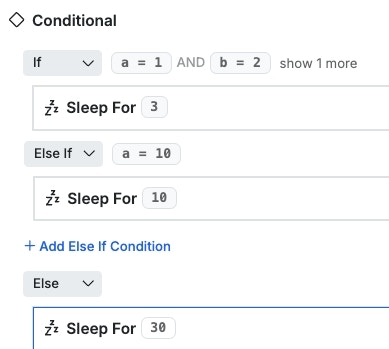 XanoScript supports `elseif` for multi-branch logic. Use `elseif` for clarity when you have more than two branches. `switch` statements are also supported as shown above.