> ## Documentation Index
> Fetch the complete documentation index at: https://docs.xano.com/llms.txt
> Use this file to discover all available pages before exploring further.
# Database Operations
### Query All Records
## Simple Query
Get all records from a table
```javascript theme={null}
db.query table as $variable
```
| Parameter | Purpose | Example |
| --------- | -------------------------------- | -------- |
| table | The name of the table to query | user |
| as | The variable to store the result | allUsers |
## **Custom Queries**
```javascript theme={null}
db.query user {
where = $db.user.id == 1
} as $user1
```
| Parameter | Purpose | Example |
| --------- | -------------------------- | ----------------------------------------- |
| where | The query condition to run | \$db.user.id == 1
|
## Joins
```javascript theme={null}
db.query user {
where = $db.user.id == 1
join = {
event_log: {
table: "event_log"
where: $db.user.id == $db.event_log.user_id
}
}
} as $user1
```
| Parameter | Purpose | Example |
| --------- | ------------------------------------------------------------------ | ------------------------------------------------------------------------ |
| join | Object containing join definitions | Each join is defined as a key-value pair with table name and join config |
| table | The name of the table being joined | "event\_log" |
| where | The conditional query to perform when matching records in the join | `$db.user.id == $db.event_log.user_id` |
## Sorting
```javascript theme={null}
db.query user {
where = $db.user.id == 1
sort = {user.name: "asc"}
} as $user1
```
| Parameter | Purpose | Example |
| --------- | ------------------------------------------------ | -------------------- |
| sort | Object defining sort order for the query results | `{user.name: "asc"}` |
## Evals
```javascript theme={null}
db.query user {
where = $db.user.id == 1
eval = {user_action: $db.event_log.action}
} as $user1
```
| Parameter | Purpose | Example |
| --------- | ------------------------------------------------------ | ------------------------------------- |
| eval | Object defining computed fields to add to the response | `{user_action: $db.event_log.action}` |
## Customizing the Response
```javascript theme={null}
db.query user {
where = $db.user.id == 1
output = ["id", "name", "email"]
} as $user1
```
| Parameter | Purpose | Example |
| --------- | --------------------------------------------------- | ------------------------ |
| output | Array of fields returned to display in the response | \["id", "name", "email"] |
## Return Options
### Return Type
Returns are defined using the `return` parameter with type and configuration options.
```javascript theme={null}
db.query user {
where = $db.user.id == 1
return = {type: "list", paging: {page: 1, per_page: 25}}
} as $user1
```
**Return Types:**
* **exists** - Returns true/false if records exist
* ```javascript theme={null}
return = {type: "exists"}
```
* **count** - Returns the number of records found
* ```javascript theme={null}
return = {type: "count"}
```
* **single** - Returns the first record found
* ```javascript theme={null}
return = {type: "single"}
```
* **list** - Returns an array of records
* ```javascript theme={null}
return = {type: "list"}
```
* **stream** - Returns records for efficient iteration
* ```javascript theme={null}
return = {type: "stream"}
```
**Paging**
Paging is configured within the return object:
```javascript theme={null}
return = {
type: "list",
paging: {
page: 1,
per_page: 25,
totals: true,
offset: 0,
metadata: true
}
}
```
**Comprehensive Example**
```javascript theme={null}
db.query user {
join = {
event_log: {
table: "event_log"
where: $db.user.id == $db.event_log.user_id
}
}
where = $db.user.name == $input.name && $db.user.created_at > 1 || $db.user.id == 1 && ($db.user.role == "member" && true) || ($db.user.role == "admin" && true)
sort = {user.name: "asc"}
eval = {user_action: $db.event_log.action}
return = {type: "list", paging: {page: 1, per_page: 25}}
output = [
"itemsReceived",
"curPage",
"nextPage",
"prevPage",
"offset",
"itemsTotal",
"pageTotal",
"items.id",
"items.created_at",
"items.name",
"items.email",
"items.account_id",
"items.role",
"items.last_login_at",
"items.password_reset.expiration",
"items.password_reset.used"
]
} as $user1
```
```javascript theme={null}
db.query user {
where = $db.user.id == $input.userId
return = {type: "exists"}
} as user1
```
```javascript theme={null}
db.query user {
where = $db.user.id == $input.userId && $db.user.userRole == "admin"
return = {type: "exists"}
} as user1
```
## Get Record
## Simple query
```javascript theme={null}
db.get test_data {
field_name = "id"
field_value = $input.id
} as $foundRecord
```
| Parameter | Description | Example |
| ------------ | ----------------------------------------------------------------------- | ----------- |
| field\_name | Uses the specified column to search against | id |
| field\_value | Uses the value to search the specified column to retrieve a found match | 1 |
| as | The variable name that holds the record found | foundRecord |
## Customizing the Response
```javascript theme={null}
db.get color_pair {
field_name = "id"
field_value = $input.id
output = ["id", "created_at", "user"]
} as $color_pair1
```
| Parameter | Purpose | Example |
| --------- | ------------------------------------------------------- | ------------------------------ |
| output | The list of fields returned to display in the response. | \["id", "created\_at", "user"] |
```javascript theme={null}
db.get test_data {
field_name = "id"
field_value = $input.id
} as foundRecord
```
## Has Record
```javascript theme={null}
db.has user {
field_name = "id"
field_value = $input.id
} as $user1
```
| Parameter | Purpose | Example |
| ------------ | -------------------------------------- | ---------- |
| field\_name | The field to search for the record | id |
| field\_value | The value to match in the search field | \$input.id |
```javascript theme={null}
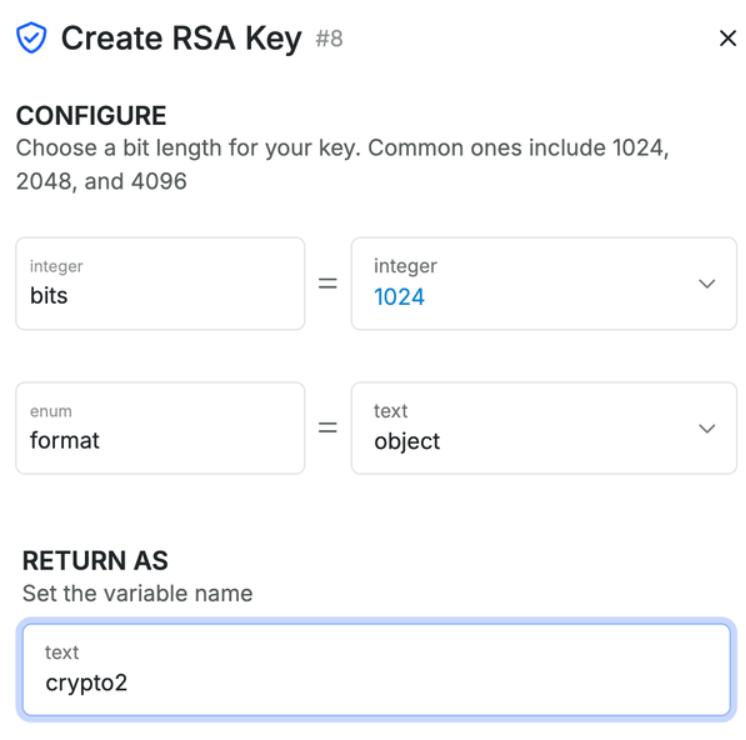
security.create_rsa_key {
bits = 1024
format = "object"
} as crypto1
```
 ## Add Record
```javascript theme={null}
db.add user {
data = {
created_at: "now",
name: $input.name,
email: $input.email,
password: $input.password
}
} as $recordAdd
```
| Parameter | Purpose | Example |
| --------- | ---------------------------------------------------------- | ------------------------------------------- |
| data | Object containing the fields and values for the new record | `{name: "John", email: "john@example.com"}` |
```javascript theme={null}
db.add user {
data = {
created_at: "now",
name: "John Doe",
email: "john@example.com",
password: "hashedPassword123"
}
} as newUser
```
## Edit Record
Edits the contents of an existing record in the database by specifying the target record and the data to update.
```javascript theme={null}
db.edit user {
field_name = "id"
field_value = 1
data = {
name: $input.name,
list: $listVar
}
} as $user2
```
| Parameter | Description | Example |
| ------------ | ------------------------------------------------- | --------------------------------- |
| field\_name | The database field name to search within | id |
| field\_value | The value to match in the specified field | 1 |
| data | Object containing the fields and values to update | `{name: 'John', list: ['item1']}` |
```javascript theme={null}
db.edit user {
field_name = "id"
field_value = 1
data = {
name: $input.name,
list: $listVar
}
} as user2
```
```javascript theme={null}
db.edit products {
field_name = "sku"
field_value = "PROD-123"
data = {
price: 29.99,
stock: 100
}
} as updatedProduct
```
> 💡 The function will only update the fields specified in the `data` object. Other fields in the record will remain unchanged.
**Notes**
* You must specify which record to update using `field_name` and `field_value`
* The `data` object should only include the fields you want to update
* You can reference input variables (`$input`) or other variables in your data object
* The updated record will be returned in the variable specified after `as`
## Add or Edit Record
```javascript theme={null}
db.add_or_edit user {
field_name = "id"
field_value = $input.id
data = {name: $input.name}
} as $recordAddOrEdit
```
| Parameter | Description | Example |
| ------------ | ----------------------------------------- | ---------------- |
| field\_name | Field to search for the record | id |
| field\_value | Value to match in the search field | 1 |
| data | Object containing fields to update/create | `{name: 'John'}` |
```javascript theme={null}
db.add_or_edit user_profile {
field_name = "user_id"
field_value = 456
data = {
bio: "Software Developer",
location: "San Francisco"
}
} as userProfile
```
## Delete Record
```javascript theme={null}
db.del user {
field_name = "id"
field_value = $input.id
}
```
| Parameter | Purpose | Example |
| ------------ | ---------------------------------- | ------- |
| field\_name | Field to search for the record | "id" |
| field\_value | Value to match in the search field | 1 |
```javascript theme={null}
db.del user {
field_name = "email"
field_value = "old@example.com"
} as deletedUser
```
## Patch Record
```javascript theme={null}
db.patch user {
field_name = "id"
field_value = $input.id
data = {}|set:"name":$input.name
} as $patchRecord
```
| Parameter | Description | Example |
| ------------ | ---------------------------------- | ---------------- |
| field\_name | Field to search for the record | id |
| field\_value | Value to match in the search field | 1 |
| data | Object with fields to patch | `{name: 'John'}` |
```javascript theme={null}
db.patch user {
field_name = "id"
field_value = 789
data = {}|set:"last_login":"now"
} as updatedLoginTime
```
## Bulk Operations
```javascript theme={null}
db.bulk.add user {
allow_id_field = false
items = [
{
name: "John Doe",
email: "john@example.com"
},
{
name: "Jane Smith",
email: "jane@example.com"
}
]
} as newUsers
```
```javascript theme={null}
db.bulk.update user {
items = $input.arrayData
} as $updateBulk
```
| Parameter | Description | Example |
| --------- | -------------------------- | ------------------------------------------------ |
| items | Array of records to update | `[{id: 1, name: 'John'}, {id: 2, name: 'Jane'}]` |
```javascript theme={null}
db.bulk.update user {
items = [
{id: 1, status: "active"},
{id: 2, status: "inactive"},
{id: 3, status: "pending"}
]
} as statusUpdates
```
```javascript theme={null}
db.bulk.patch user {
items = $input.arrayData
} as $patchBulk
```
| Parameter | Description | Example |
| --------- | ------------------------- | ------------------------------------------------ |
| items | Array of records to patch | `[{id: 1, name: 'John'}, {id: 2, name: 'Jane'}]` |
```javascript theme={null}
db.bulk.patch user {
items = [
{id: 1, data: {}|set:"role":"admin"},
{id: 2, data: {}|set:"role":"moderator"}
]
} as roleUpdates
```
| Parameter | Description | Example |
| --------- | ---------------------------- | -------------------- |
| search | Query condition for deletion | `$db.user.id >= 100` |
```javascript theme={null}
db.bulk.delete user {
search = `$db.user.status == "inactive" && $db.user.last_login < "2023-01-01"`
} as inactiveUsersDeletion
```
> 💡 Bulk operations are more efficient than performing multiple individual operations when working with multiple records.
**Notes**
* All operations return the affected record(s) in the variable specified after `as`
* Bulk operations can significantly improve performance when working with multiple records
* The `field_name` and `field_value` combination is used to identify specific records
* Patch operations are useful when you want to update specific fields without affecting others
* The `|set:` operator in patch operations allows you to update only specified fields, leaving others unchanged. For example, `data = {}|set:"name":$input.name` will only update the `name` field in the record.
* Always use valid table and field names as defined in your Xano database.
* You can reference input variables (`$input`) or other variables in your data object for dynamic updates.
* For best performance, prefer bulk operations when working with many records instead of looping single operations.
## Direct Database Query
```javascript theme={null}
db.direct_query {
sql = "SELECT * FROM x52_245;"
parser = "template_engine"
response_type = "list"
} as $x1
```
| Parameter | Description | Example |
| -------------- | ----------------------------------- | ------------------------------------------------------------ |
| sql | The raw SQL query to execute | `"SELECT * FROM users;"` |
| parser | The parser to use for the SQL query | `"template_engine"` or do not include for prepared statement |
| response\_type | The expected response type | `"list"` or `"single"` |
If you're using a prepared statement (with `?` placehholders), you can pass in arguments using the `arg` parameter, as shown below in the examples.
```javascript theme={null}
// Get a single user by ID using the template engine
db.direct_query {
sql = "SELECT * FROM x52_245 WHERE id = {{ $auth.id|sql_esc }};"
parser = "template_engine"
response_type = "single"
} as $x2
```
```javascript theme={null}
// Get a single user by ID using a prepared statement with arguments
db.direct_query {
sql = "SELECT * FROM x52_245 WHERE id = ?;"
response_type = "list"
arg = $auth.id
} as $x1
```
## Database Transaction
```javascript theme={null}
db.transaction {
stack {
db.add user {
data = {
created_at: "now"
name : ""
email : null
password : null
}
} as $user1
}
}
```
## Clear All Records
```javascript theme={null}
db.truncate table_name {
reset = false
}
```
| Parameter | Description | Example |
| ----------- | -------------------------------------- | ----------------- |
| table\_name | The name of the table to clear | `user` |
| reset | Whether to reset auto-incrementing IDs | `true` or `false` |
## Get Database Schema
```javascript theme={null}
db.schema table_name {
path = ""
} as $user1
```
| Parameter | Description | Example |
| ----------- | ----------------------------------------------------------------------------------------------------------- | ------- |
| table\_name | The name of the table to get the schema for | `user` |
| path | Optional path to a specific field in the schema -- helpful for only returning the schema of an object field | `name` |
```javascript theme={null}
db.schema user {
path = "name"
} as $user1
```
## External Database Queries
* External MSSQL Query
* External MySQL Query
* External PostgreSQL Query
* External Oracle Query
These statements are very similar to the `db.direct_query` statement shown above, but are used to connect to external databases configured in your Xano workspace settings and have an additional `connection_string` parameter to specify how to connect to the external database.
```javascript theme={null}
db.external.mssql.direct_query {
sql = "SELECT * FROM user WHERE id = 1"
response_type = "list"
connection_string = "mssql://username:password@123.456.789.123:1433/my_database?sslmode=enabled"
} as $x1
db.external.mysql.direct_query ...
db.external.oracle.direct_query ...
db.external.postgres.direct_query ...
```
## Add Record
```javascript theme={null}
db.add user {
data = {
created_at: "now",
name: $input.name,
email: $input.email,
password: $input.password
}
} as $recordAdd
```
| Parameter | Purpose | Example |
| --------- | ---------------------------------------------------------- | ------------------------------------------- |
| data | Object containing the fields and values for the new record | `{name: "John", email: "john@example.com"}` |
```javascript theme={null}
db.add user {
data = {
created_at: "now",
name: "John Doe",
email: "john@example.com",
password: "hashedPassword123"
}
} as newUser
```
## Edit Record
Edits the contents of an existing record in the database by specifying the target record and the data to update.
```javascript theme={null}
db.edit user {
field_name = "id"
field_value = 1
data = {
name: $input.name,
list: $listVar
}
} as $user2
```
| Parameter | Description | Example |
| ------------ | ------------------------------------------------- | --------------------------------- |
| field\_name | The database field name to search within | id |
| field\_value | The value to match in the specified field | 1 |
| data | Object containing the fields and values to update | `{name: 'John', list: ['item1']}` |
```javascript theme={null}
db.edit user {
field_name = "id"
field_value = 1
data = {
name: $input.name,
list: $listVar
}
} as user2
```
```javascript theme={null}
db.edit products {
field_name = "sku"
field_value = "PROD-123"
data = {
price: 29.99,
stock: 100
}
} as updatedProduct
```
> 💡 The function will only update the fields specified in the `data` object. Other fields in the record will remain unchanged.
**Notes**
* You must specify which record to update using `field_name` and `field_value`
* The `data` object should only include the fields you want to update
* You can reference input variables (`$input`) or other variables in your data object
* The updated record will be returned in the variable specified after `as`
## Add or Edit Record
```javascript theme={null}
db.add_or_edit user {
field_name = "id"
field_value = $input.id
data = {name: $input.name}
} as $recordAddOrEdit
```
| Parameter | Description | Example |
| ------------ | ----------------------------------------- | ---------------- |
| field\_name | Field to search for the record | id |
| field\_value | Value to match in the search field | 1 |
| data | Object containing fields to update/create | `{name: 'John'}` |
```javascript theme={null}
db.add_or_edit user_profile {
field_name = "user_id"
field_value = 456
data = {
bio: "Software Developer",
location: "San Francisco"
}
} as userProfile
```
## Delete Record
```javascript theme={null}
db.del user {
field_name = "id"
field_value = $input.id
}
```
| Parameter | Purpose | Example |
| ------------ | ---------------------------------- | ------- |
| field\_name | Field to search for the record | "id" |
| field\_value | Value to match in the search field | 1 |
```javascript theme={null}
db.del user {
field_name = "email"
field_value = "old@example.com"
} as deletedUser
```
## Patch Record
```javascript theme={null}
db.patch user {
field_name = "id"
field_value = $input.id
data = {}|set:"name":$input.name
} as $patchRecord
```
| Parameter | Description | Example |
| ------------ | ---------------------------------- | ---------------- |
| field\_name | Field to search for the record | id |
| field\_value | Value to match in the search field | 1 |
| data | Object with fields to patch | `{name: 'John'}` |
```javascript theme={null}
db.patch user {
field_name = "id"
field_value = 789
data = {}|set:"last_login":"now"
} as updatedLoginTime
```
## Bulk Operations
```javascript theme={null}
db.bulk.add user {
allow_id_field = false
items = [
{
name: "John Doe",
email: "john@example.com"
},
{
name: "Jane Smith",
email: "jane@example.com"
}
]
} as newUsers
```
```javascript theme={null}
db.bulk.update user {
items = $input.arrayData
} as $updateBulk
```
| Parameter | Description | Example |
| --------- | -------------------------- | ------------------------------------------------ |
| items | Array of records to update | `[{id: 1, name: 'John'}, {id: 2, name: 'Jane'}]` |
```javascript theme={null}
db.bulk.update user {
items = [
{id: 1, status: "active"},
{id: 2, status: "inactive"},
{id: 3, status: "pending"}
]
} as statusUpdates
```
```javascript theme={null}
db.bulk.patch user {
items = $input.arrayData
} as $patchBulk
```
| Parameter | Description | Example |
| --------- | ------------------------- | ------------------------------------------------ |
| items | Array of records to patch | `[{id: 1, name: 'John'}, {id: 2, name: 'Jane'}]` |
```javascript theme={null}
db.bulk.patch user {
items = [
{id: 1, data: {}|set:"role":"admin"},
{id: 2, data: {}|set:"role":"moderator"}
]
} as roleUpdates
```
| Parameter | Description | Example |
| --------- | ---------------------------- | -------------------- |
| search | Query condition for deletion | `$db.user.id >= 100` |
```javascript theme={null}
db.bulk.delete user {
search = `$db.user.status == "inactive" && $db.user.last_login < "2023-01-01"`
} as inactiveUsersDeletion
```
> 💡 Bulk operations are more efficient than performing multiple individual operations when working with multiple records.
**Notes**
* All operations return the affected record(s) in the variable specified after `as`
* Bulk operations can significantly improve performance when working with multiple records
* The `field_name` and `field_value` combination is used to identify specific records
* Patch operations are useful when you want to update specific fields without affecting others
* The `|set:` operator in patch operations allows you to update only specified fields, leaving others unchanged. For example, `data = {}|set:"name":$input.name` will only update the `name` field in the record.
* Always use valid table and field names as defined in your Xano database.
* You can reference input variables (`$input`) or other variables in your data object for dynamic updates.
* For best performance, prefer bulk operations when working with many records instead of looping single operations.
## Direct Database Query
```javascript theme={null}
db.direct_query {
sql = "SELECT * FROM x52_245;"
parser = "template_engine"
response_type = "list"
} as $x1
```
| Parameter | Description | Example |
| -------------- | ----------------------------------- | ------------------------------------------------------------ |
| sql | The raw SQL query to execute | `"SELECT * FROM users;"` |
| parser | The parser to use for the SQL query | `"template_engine"` or do not include for prepared statement |
| response\_type | The expected response type | `"list"` or `"single"` |
If you're using a prepared statement (with `?` placehholders), you can pass in arguments using the `arg` parameter, as shown below in the examples.
```javascript theme={null}
// Get a single user by ID using the template engine
db.direct_query {
sql = "SELECT * FROM x52_245 WHERE id = {{ $auth.id|sql_esc }};"
parser = "template_engine"
response_type = "single"
} as $x2
```
```javascript theme={null}
// Get a single user by ID using a prepared statement with arguments
db.direct_query {
sql = "SELECT * FROM x52_245 WHERE id = ?;"
response_type = "list"
arg = $auth.id
} as $x1
```
## Database Transaction
```javascript theme={null}
db.transaction {
stack {
db.add user {
data = {
created_at: "now"
name : ""
email : null
password : null
}
} as $user1
}
}
```
## Clear All Records
```javascript theme={null}
db.truncate table_name {
reset = false
}
```
| Parameter | Description | Example |
| ----------- | -------------------------------------- | ----------------- |
| table\_name | The name of the table to clear | `user` |
| reset | Whether to reset auto-incrementing IDs | `true` or `false` |
## Get Database Schema
```javascript theme={null}
db.schema table_name {
path = ""
} as $user1
```
| Parameter | Description | Example |
| ----------- | ----------------------------------------------------------------------------------------------------------- | ------- |
| table\_name | The name of the table to get the schema for | `user` |
| path | Optional path to a specific field in the schema -- helpful for only returning the schema of an object field | `name` |
```javascript theme={null}
db.schema user {
path = "name"
} as $user1
```
## External Database Queries
* External MSSQL Query
* External MySQL Query
* External PostgreSQL Query
* External Oracle Query
These statements are very similar to the `db.direct_query` statement shown above, but are used to connect to external databases configured in your Xano workspace settings and have an additional `connection_string` parameter to specify how to connect to the external database.
```javascript theme={null}
db.external.mssql.direct_query {
sql = "SELECT * FROM user WHERE id = 1"
response_type = "list"
connection_string = "mssql://username:password@123.456.789.123:1433/my_database?sslmode=enabled"
} as $x1
db.external.mysql.direct_query ...
db.external.oracle.direct_query ...
db.external.postgres.direct_query ...
```