> ## Documentation Index
> Fetch the complete documentation index at: https://docs.xano.com/llms.txt
> Use this file to discover all available pages before exploring further.

# Security

## <Icon icon="https://mintcdn.com/xano-997cb9ee/aZQYcxhIvSDTNEim/images/icons/xs_temp.svg?fit=max&auto=format&n=aZQYcxhIvSDTNEim&q=85&s=6e05b86a660544b2d6040353bd8faac8" size={46} width="371" height="137" data-path="images/icons/xs_temp.svg" /> Generate UUID

```javascript theme={null}
    security.create_uuid as $myVariable
```

<table><thead><tr><th width="175">Parameter</th><th>Purpose</th><th>Example</th></tr></thead><tbody><tr><td>\$myVariable</td><td>This is the variable you want to store the generated value in.</td><td>\$myVariable</td></tr></tbody></table>

<Accordion title="Example">
  ```javascript theme={null}
      security.create_uuid as $myVariable
  ```

  <img src="https://mintlify.s3.us-west-1.amazonaws.com/xano-997cb9ee/images/CleanShot%202025-03-06%20at%2017.26.44.png" alt="" />
</Accordion>

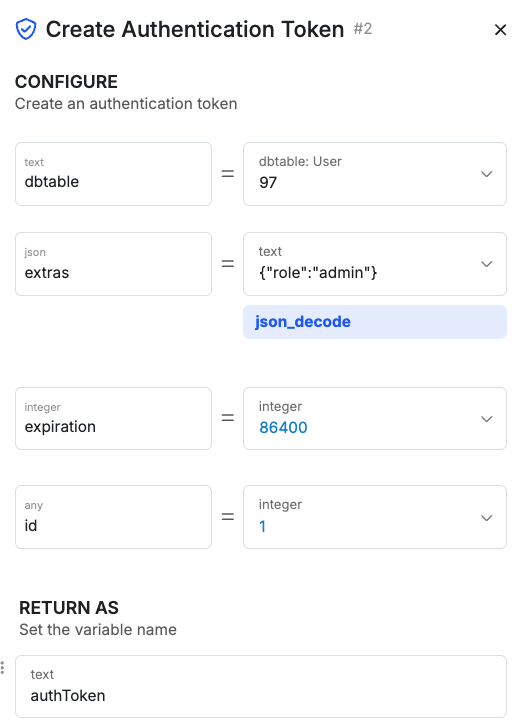
## <Icon icon="https://mintcdn.com/xano-997cb9ee/aZQYcxhIvSDTNEim/images/icons/xs_temp.svg?fit=max&auto=format&n=aZQYcxhIvSDTNEim&q=85&s=6e05b86a660544b2d6040353bd8faac8" size={46} width="371" height="137" data-path="images/icons/xs_temp.svg" /> Create Authentication Token

```xs theme={null}
    security.create_auth_token {
      table = "users"
      extras = { "role": "admin" }
      expiration = 86400
      id = 1
    } as $authToken
```

<table><thead><tr><th width="175">Parameter</th><th>Purpose</th><th>Example</th></tr></thead><tbody><tr><td>dbtable</td><td>The ID of the database table that has authentication enabled</td><td>"97"</td></tr><tr><td>extras</td><td>A JSON object that contains any extra information you want to include in the token</td><td><pre><code>    '\{"role":"admin"}'|json\_decode</code></pre></td></tr><tr><td>expiration</td><td>The time in seconds that the token should remain valid</td><td>86400</td></tr><tr><td>id</td><td>The ID of the record to use to generate the authentication token</td><td>1</td></tr><tr><td>as</td><td>The variable to store the generated token in</td><td>\$authToken</td></tr></tbody></table>

<Accordion title="Example">
  ```xs theme={null}
      security.create_auth_token {
        table = "users"
        extras = { "role": "admin" }
        expiration = 86400
        id = 1
      } as $authToken
  ```

  <img src="https://mintlify.s3.us-west-1.amazonaws.com/xano-997cb9ee/images/CleanShot%202025-03-06%20at%2017.42.26.png" alt="" />
</Accordion>

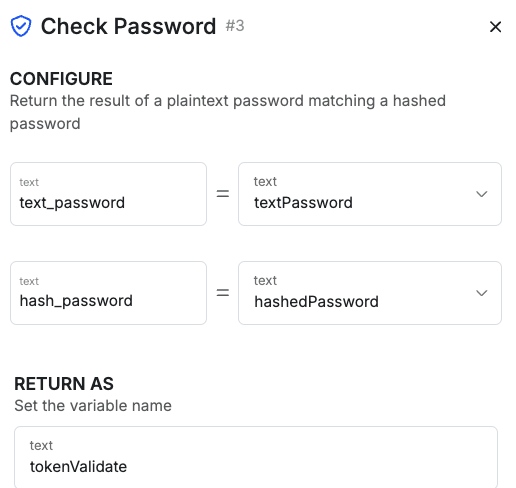
## <Icon icon="https://mintcdn.com/xano-997cb9ee/aZQYcxhIvSDTNEim/images/icons/xs_temp.svg?fit=max&auto=format&n=aZQYcxhIvSDTNEim&q=85&s=6e05b86a660544b2d6040353bd8faac8" size={46} width="371" height="137" data-path="images/icons/xs_temp.svg" /> Validate Password

```xs theme={null}
    security.check_password {
      text_password = "textPassword"
      hash_password = "hashedPassword"
    } as $tokenValidate
```

<table><thead><tr><th width="175">Parameter</th><th>Purpose</th><th>Example</th></tr></thead><tbody><tr><td>text\_password</td><td>The text version of the password to check</td><td>"textPassword"<br />\$textPassword</td></tr><tr><td>hash\_password</td><td>The hashed version of the password to check, usually coming from a database table</td><td>"hashedPassword"<br />\$user1.password</td></tr></tbody></table>

<Accordion title="Example">
  ```javascript theme={null}
      security.check_password {
        text_password = "textPassword"
        hash_password = "hashedPassword"
      } as tokenValidate
  ```

  <img src="https://mintlify.s3.us-west-1.amazonaws.com/xano-997cb9ee/images/CleanShot%202025-03-06%20at%2017.44.31.png" alt="" />
</Accordion>

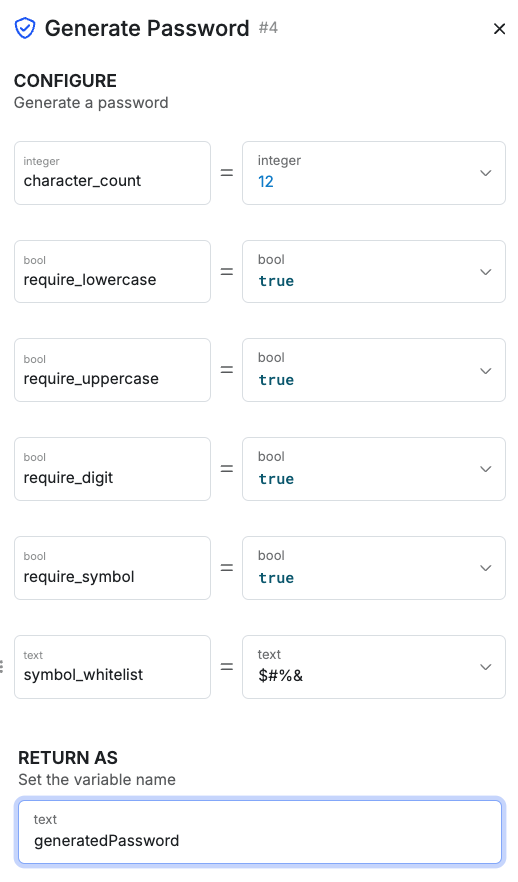
## <Icon icon="https://mintcdn.com/xano-997cb9ee/aZQYcxhIvSDTNEim/images/icons/xs_temp.svg?fit=max&auto=format&n=aZQYcxhIvSDTNEim&q=85&s=6e05b86a660544b2d6040353bd8faac8" size={46} width="371" height="137" data-path="images/icons/xs_temp.svg" /> Generate Password <a href="#xs-securitygeneratepw" id="xs-securitygeneratepw" />

```xs theme={null}
    security.create_password {
      character_count = 12
      require_lowercase = true
      require_uppercase = true
      require_digit = true
      require_symbol = true
      symbol_whitelist = "$#%&"
    } as $generatedPassword
```

<table><thead><tr><th width="187">Parameter</th><th>Purpose</th><th>Example</th></tr></thead><tbody><tr><td>character\_count</td><td>The length of the generated password</td><td>12</td></tr><tr><td>require\_lowercase<br />require\_uppercase<br />require\_digit<br />require\_symbol</td><td>Various specifications for the generated password</td><td><pre><code>require\_lowercase = true
require\_uppercase = true
require\_digit = true
require\_symbol = true
</code></pre></td></tr><tr><td>symbol\_whitelist</td><td>If you require symbols in your generated password, whitelist the allowed symbols here.</td><td><pre><code>symbol\_whitelist = "\$#%&"</code></pre></td></tr><tr><td>as</td><td>The variable that you want to store the generated password.</td><td>generatedPassword</td></tr></tbody></table>

<Accordion title="Example">
  ```javascript theme={null}
      security.create_password {
        character_count = 12
        require_lowercase = true
        require_uppercase = true
        require_digit = true
        require_symbol = true
        symbol_whitelist = "$#%&"
      } as generatedPassword
  ```

  <img src="https://mintlify.s3.us-west-1.amazonaws.com/xano-997cb9ee/images/CleanShot%202025-03-06%20at%2017.55.31.png" alt="" />
</Accordion>

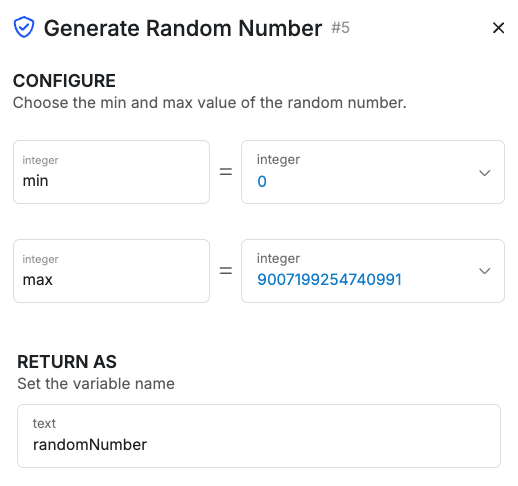
## <Icon icon="https://mintcdn.com/xano-997cb9ee/aZQYcxhIvSDTNEim/images/icons/xs_temp.svg?fit=max&auto=format&n=aZQYcxhIvSDTNEim&q=85&s=6e05b86a660544b2d6040353bd8faac8" size={46} width="371" height="137" data-path="images/icons/xs_temp.svg" /> Generate Random Number

```xs theme={null}
    security.random_number {
      min = 0
      max = 9007199254740991
    } as $randomNumber
```

<table><thead><tr><th width="175">Parameter</th><th>Purpose</th><th>Example</th></tr></thead><tbody><tr><td>min</td><td>The beginning of the range for the randomly generated number</td><td>0</td></tr><tr><td>max</td><td>The end of the range for the randomly generated number</td><td>10000</td></tr><tr><td>as</td><td>The variable that you want to store the generated number</td><td>randomNumber</td></tr></tbody></table>

<Accordion title="Example">
  ```javascript theme={null}
      security.random_number {
        min = 0
        max = 9007199254740991
      } as randomNumber
  ```

  <img src="https://mintlify.s3.us-west-1.amazonaws.com/xano-997cb9ee/images/CleanShot%202025-03-06%20at%2018.16.07.png" alt="" />
</Accordion>

## <Icon icon="https://mintcdn.com/xano-997cb9ee/aZQYcxhIvSDTNEim/images/icons/xs_temp.svg?fit=max&auto=format&n=aZQYcxhIvSDTNEim&q=85&s=6e05b86a660544b2d6040353bd8faac8" size={46} width="371" height="137" data-path="images/icons/xs_temp.svg" /> Generate Random Bytes

```xs theme={null}
    security.random_bytes {
      length = 16
    } as $randomBytes
```

<table><thead><tr><th width="175">Parameter</th><th>Purpose</th><th>Example</th></tr></thead><tbody><tr><td>length</td><td>The length of the string you'd like to generate</td><td>16</td></tr><tr><td>as</td><td>The variable that you want to store the random bytes generated</td><td>randomBytes</td></tr></tbody></table>

<Accordion title="Example">
  ```javascript theme={null}
      security.random_bytes {
        length = 16
      } as randomBytes
  ```

  <img src="https://mintlify.s3.us-west-1.amazonaws.com/xano-997cb9ee/images/CleanShot%202025-03-06%20at%2022.04.57@2x.png" alt="" />
</Accordion>

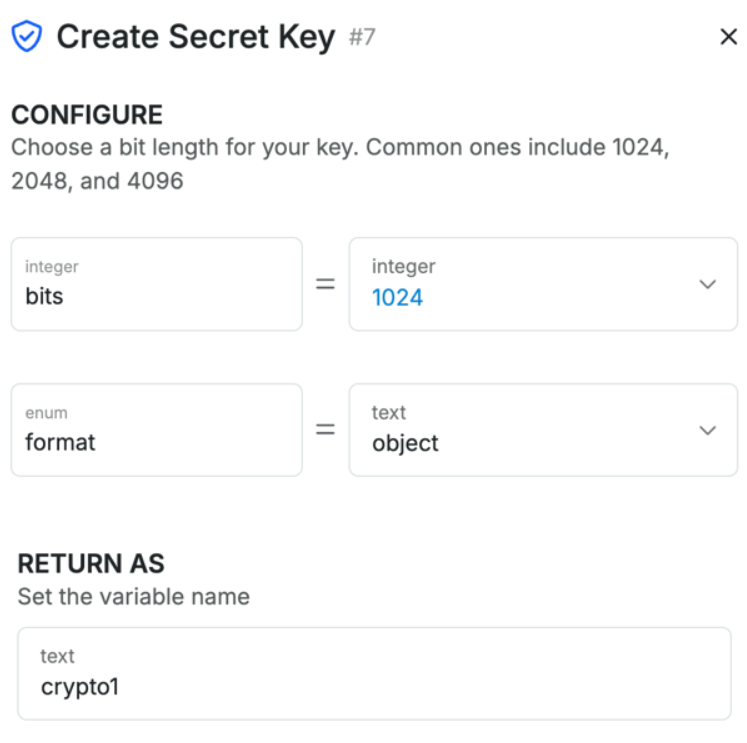
## <Icon icon="https://mintcdn.com/xano-997cb9ee/aZQYcxhIvSDTNEim/images/icons/xs_temp.svg?fit=max&auto=format&n=aZQYcxhIvSDTNEim&q=85&s=6e05b86a660544b2d6040353bd8faac8" size={46} width="371" height="137" data-path="images/icons/xs_temp.svg" /> Create Secret Key

```xs theme={null}
    security.create_secret_key {
      bits = 1024
      format = "object"
    } as $crypto1
```

<table><thead><tr><th width="175">Parameter</th><th>Purpose</th><th>Example</th></tr></thead><tbody><tr><td>bits</td><td>The length of the key generated. Common values are 1024, 2048, 4096, etc...</td><td>1024</td></tr><tr><td>format</td><td>The format of the key generated. This can be either <strong>object</strong> or <strong>base64</strong></td><td>"object"</td></tr><tr><td>as</td><td>The variable that you want to store the key</td><td>crypto1</td></tr></tbody></table>

<Accordion title="Example">
  ```javascript theme={null}
      security.create_secret_key {
        bits = 1024
        format = "object"
      } as crypto1
  ```

  <img src="https://mintlify.s3.us-west-1.amazonaws.com/xano-997cb9ee/images/CleanShot%202025-03-06%20at%2022.08.06@2x.png" alt="" />
</Accordion>

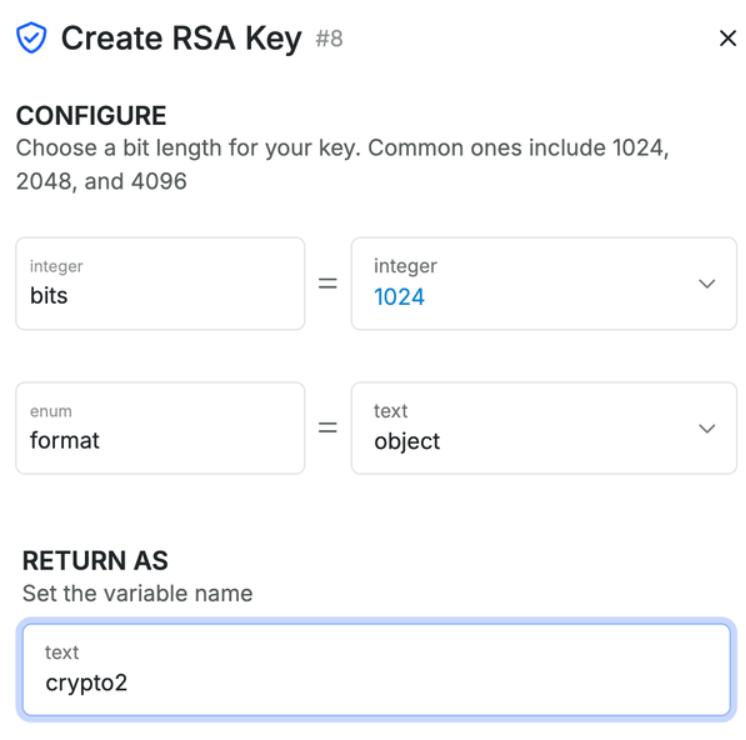
## <Icon icon="https://mintcdn.com/xano-997cb9ee/aZQYcxhIvSDTNEim/images/icons/xs_temp.svg?fit=max&auto=format&n=aZQYcxhIvSDTNEim&q=85&s=6e05b86a660544b2d6040353bd8faac8" size={46} width="371" height="137" data-path="images/icons/xs_temp.svg" /> Create RSA Key

```xs theme={null}
    security.create_rsa_key {
      bits = 1024
      format = "object"
    } as $crypto1
```

<table><thead><tr><th width="175">Parameter</th><th>Purpose</th><th>Example</th></tr></thead><tbody><tr><td>bits</td><td>The length of the key generated. Common values are 1024, 2048, 4096, etc...</td><td>1024</td></tr><tr><td>format</td><td>The format of the key generated. This can be either <strong>object</strong> or <strong>base64</strong></td><td>"object"</td></tr><tr><td>as</td><td>The variable that you want to store the key</td><td>crypto1</td></tr></tbody></table>

<Accordion title="Example">
  ```javascript theme={null}
      security.create_rsa_key {
        bits = 1024
        format = "object"
      } as crypto1
  ```

  <img src="https://mintlify.s3.us-west-1.amazonaws.com/xano-997cb9ee/images/CleanShot%202025-03-06%20at%2022.09.40@2x.png" alt="" />
</Accordion>

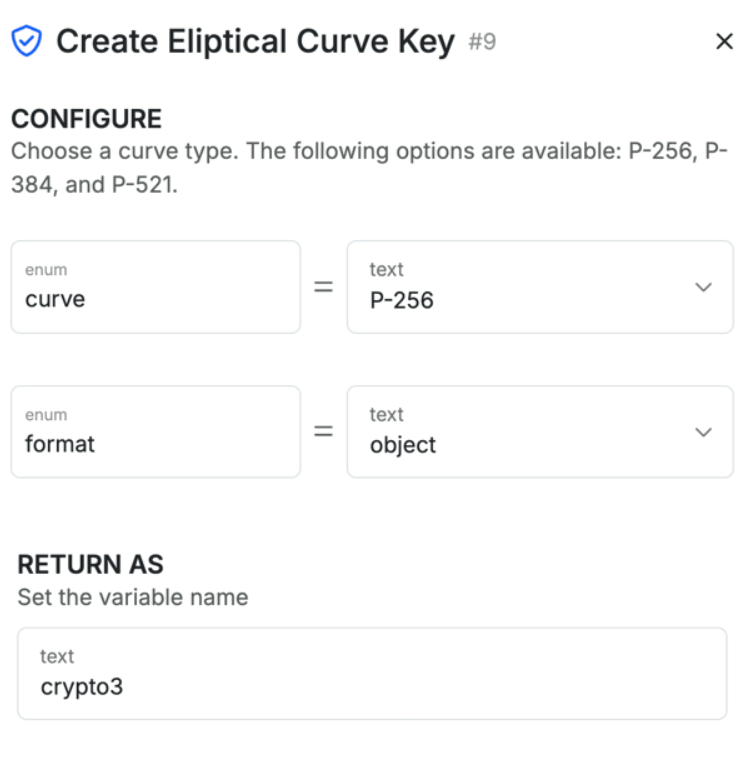
## <Icon icon="https://mintcdn.com/xano-997cb9ee/aZQYcxhIvSDTNEim/images/icons/xs_temp.svg?fit=max&auto=format&n=aZQYcxhIvSDTNEim&q=85&s=6e05b86a660544b2d6040353bd8faac8" size={46} width="371" height="137" data-path="images/icons/xs_temp.svg" /> Create Elliptic Curve Key

```xs theme={null}
    security.create_curve_key {
      curve = "P-256"
      format = "object"
    } as $crypto3
```

## <Icon icon="https://mintcdn.com/xano-997cb9ee/aZQYcxhIvSDTNEim/images/icons/xs_temp.svg?fit=max&auto=format&n=aZQYcxhIvSDTNEim&q=85&s=6e05b86a660544b2d6040353bd8faac8" size={46} width="371" height="137" data-path="images/icons/xs_temp.svg" /> Encrypt Data

```xs theme={null}
    security.encrypt {
      data = $sensitive_data
      algorithm = "aes-256-cbc"
      key = "encryption_key"
      iv = "init_vector"
    } as $encrypted_data
```

Encrypts a payload into binary data using the specified algorithm, key, and initialization vector. The result is stored in `$encrypted_data`.

## <Icon icon="https://mintcdn.com/xano-997cb9ee/aZQYcxhIvSDTNEim/images/icons/xs_temp.svg?fit=max&auto=format&n=aZQYcxhIvSDTNEim&q=85&s=6e05b86a660544b2d6040353bd8faac8" size={46} width="371" height="137" data-path="images/icons/xs_temp.svg" /> Decrypt Data

```xs theme={null}
    security.decrypt {
      data = $encrypted_data
      algorithm = "aes-256-cbc"
      key = "encryption_key"
      iv = "init_vector"
    } as $decrypted_data
```

Decrypts a payload back to its original form using the specified algorithm, key, and initialization vector. The result is stored in `$decrypted_data`.

## <Icon icon="https://mintcdn.com/xano-997cb9ee/aZQYcxhIvSDTNEim/images/icons/xs_temp.svg?fit=max&auto=format&n=aZQYcxhIvSDTNEim&q=85&s=6e05b86a660544b2d6040353bd8faac8" size={46} width="371" height="137" data-path="images/icons/xs_temp.svg" /> JWS Encode

```xs theme={null}
    security.jws_encode {
      headers = { "alg": "HS256" }
      claims = { "user_id": "123" }
      key = "signing_key"
      signature_algorithm = "HS256"
      ttl = 3600
    } as $signed_token
```

Encodes a payload as a JSON Web Signature (JWS) token with headers, claims, and a key. The result is stored in `$signed_token`.

## <Icon icon="https://mintcdn.com/xano-997cb9ee/aZQYcxhIvSDTNEim/images/icons/xs_temp.svg?fit=max&auto=format&n=aZQYcxhIvSDTNEim&q=85&s=6e05b86a660544b2d6040353bd8faac8" size={46} width="371" height="137" data-path="images/icons/xs_temp.svg" /> JWS Decode

```xs theme={null}
    security.jws_decode {
      token = $jws_token
      key = "signing_key"
      check_claims = { "user_id": "123" }
      signature_algorithm = "HS256"
      timeDrift = 0
    } as $verified_payload
```

Decodes a JWS token using the key and signature algorithm. The result is stored in `$verified_payload`.

## <Icon icon="https://mintcdn.com/xano-997cb9ee/aZQYcxhIvSDTNEim/images/icons/xs_temp.svg?fit=max&auto=format&n=aZQYcxhIvSDTNEim&q=85&s=6e05b86a660544b2d6040353bd8faac8" size={46} width="371" height="137" data-path="images/icons/xs_temp.svg" /> JWE Encode

```xs theme={null}
    security.jwe_encode {
      headers = { "alg": "A256KW" }
      claims = { "data": "secret" }
      key = "encryption_key"
      key_algorithm = "A256KW"
      content_algorithm = "A256GCM"
      ttl = 0
    } as $encrypted_token
```

Encodes a payload as a JSON Web Encryption (JWE) token with headers, claims, and a key. The result is stored in `$encrypted_token`.

## <Icon icon="https://mintcdn.com/xano-997cb9ee/aZQYcxhIvSDTNEim/images/icons/xs_temp.svg?fit=max&auto=format&n=aZQYcxhIvSDTNEim&q=85&s=6e05b86a660544b2d6040353bd8faac8" size={46} width="371" height="137" data-path="images/icons/xs_temp.svg" /> JWE Decode

```xs theme={null}
    security.jwe_decode {
      token = $jwe_token
      key = "decryption_key"
      check_claims = { "iss": "my_app" }
      key_algorithm = "A256KW"
      content_algorithm = "A256GCM"
      timeDrift = 0
    } as $decoded_payload
```

Decodes a JWE token using the key, key algorithm, and content algorithm. The result is stored in `$decoded_payload`.

<table><thead><tr><th width="175">Parameter</th><th>Purpose</th><th>Example</th></tr></thead><tbody><tr><td>curve</td><td>The curve applied to the generated key. Can be P-256, P-384, or P-521</td><td>P-256</td></tr><tr><td>format</td><td>The format of the key generated. This can be either <strong>object</strong> or <strong>base64</strong></td><td>"object"</td></tr><tr><td>as</td><td>The variable that you want to store the key</td><td>crypto3</td></tr></tbody></table>

<Accordion title="Example">
  ```javascript theme={null}
      security.create_curve_key {
        curve = "P-256"
        format = "object"
      } as crypto3
  ```

  <img src="https://mintlify.s3.us-west-1.amazonaws.com/xano-997cb9ee/images/CleanShot%202025-03-06%20at%2022.15.45@2x.png" alt="" />
</Accordion>