

 Xano
Xano--records flag.
Schema Changes and Data Impact
Pushing XanoScript that modifies table structure can have irreversible effects on your data. The push preview classifies every operation before you confirm — here’s what each one means:Tables
Columns
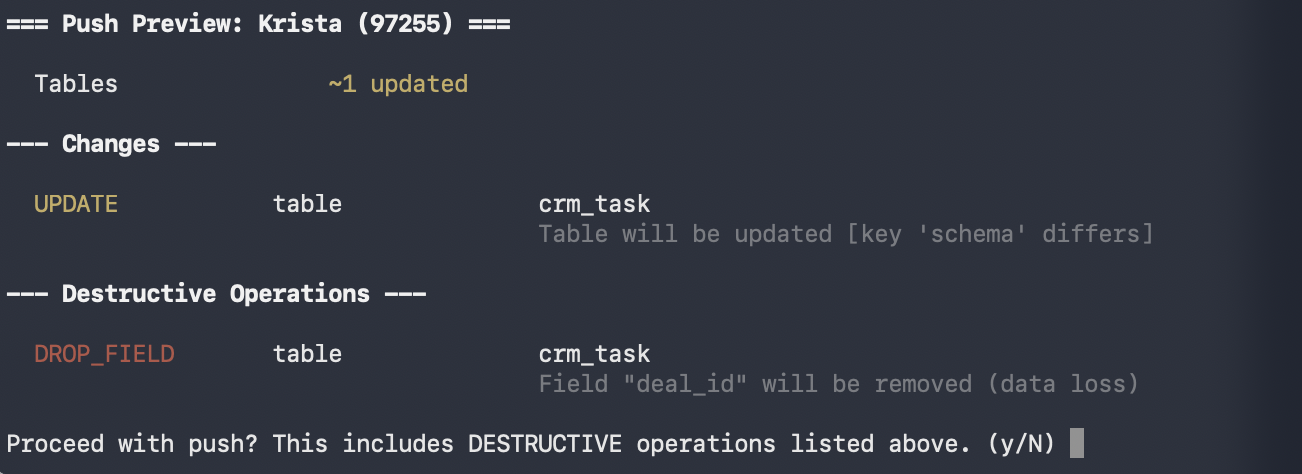
Destructive operations —
DELETE, CASCADE_DELETE, DROP_FIELD, and ALTER_FIELD — are called out separately in the push preview so they’re easy to spot before confirming.
Pull Records
Pull your table records alongside the schema: Record files are written alongside each table’s schema file. This is also the fastest way to create a local backup of your data before making schema changes.Push Records
Records are off by default on push. To include them, you must have first pulled with--records (so the data exists locally), then explicitly pass --records on push:
Snapshot Your Data Before Schema Changes
Before pushing any changes that alter table structure — removing or renaming columns, changing field types — pull a local copy of your records first: This gives you a local snapshot you can push back if something goes wrong. Pair this withgit commit before pushing so you have a known-good restore point for both schema and data.
Truncate Records Before Importing
Use--truncate to wipe all existing rows from every table before importing records from your local files. This is useful when resetting a staging or test workspace to a known dataset:
Deletions and the --delete Flag
By default, the CLI never deletes objects or records from your Xano workspace that aren’t present in your local files. Objects removed locally are simply ignored during a push — your Xano workspace keeps them as-is.
To delete objects from Xano that don’t exist locally, you must explicitly pass --delete:
--delete requires --sync because deletion only applies during a full push — it removes remote objects that are not present in the local files being sent.--delete ended up in a command, git diff will show you any changes to local files, and the push preview will clearly list any objects marked for deletion before you confirm.
Reviewing Your Push
Everyxano workspace push automatically runs a preview before making any changes. It shows exactly what will be created, updated, or deleted — and calls out destructive operations like DROP_FIELD, ALTER_FIELD, and TRUNCATE separately so they’re hard to miss.
To see the preview without pushing, use --dry-run:
Use Git to Protect Your Work
Your local XanoScript files are plain files on disk — treat them like production infrastructure code and use Git to track every change:- Initialize a Git repository in your workspace directory so every change is tracked.
- Review diffs before pushing — run
git diff(or use your IDE’s source control panel) to inspect exactly what has changed since your last push. Pay close attention to table schema files. - Commit before pushing — create a Git commit before running
xano workspace pushso you have a known-good snapshot to revert to if something goes wrong. - Snapshot your data — pull with
--recordsbefore any schema change so you have a local copy of your data you can restore from if needed.