Xano
XanoOverview
Static Hosting is a feature that allows you to host static files on your Xano instance. It’s great for hosting your frontend right alongside your backend, or even just deploying quick tests as you build and iterate on your application. Static Hosting is available on every plan, including Free. Free plans can publish one static hosting URL and cannot use custom domains; paid plans raise the site limit and add custom domain support.Supported Technologies
Static Hosting serves pre-built frontend assets — HTML, CSS, and JavaScript. When apackage.json file is present, Xano automatically runs your build script (e.g. npm run build) and hosts the generated output.
Any frontend framework that produces static output is supported. This includes frameworks that use Node.js during the build step — Xano runs Node.js to build your project, it just doesn’t run a persistent Node.js server at runtime.
Works With
- React (Create React App, Vite, etc.)
- Next.js (using
output: 'export'for static export) - Vue (Vue CLI or Vite)
- Svelte and SvelteKit (static adapter)
- Astro
- Angular
- Vanilla HTML/CSS/JS projects (no build step required)
- Any other framework that outputs static files during build
💡 If your project can produce a staticbuild,dist, oroutfolder, Xano can host it.
What Static Hosting Does Not Do
Static Hosting does not run a persistent server process at runtime. Your project is built once, and the resulting static files are served. This means:- No server-side rendering (SSR) at request time — use static export / static site generation (SSG) instead
- No backend application servers (e.g., Express, Django, Flask, Rails)
- No server-side languages running at runtime (Python, PHP, Ruby, etc.)
This does not mean you can’t use frameworks built on Node.js. Frameworks like Next.js, Astro, and SvelteKit all work great — just configure them to output static files instead of relying on a runtime server. Your Xano backend handles all server-side logic via APIs.
Example Project Structure
Creating a new site
1
Navigate to Static Hosting
From the sidebar, switch to the Host Files tab, and choose Static Hosts.
2
Create a new site
In the top-right corner, click Create New Site.Give your site a name and a description, and click Create.
Uploading a site
- In Xano
- Using the VS Code Extension
Each upload starts with a build, which you can think of as a snapshot of your site at that time.After creating a site, choose it from the list and click Upload Build.
Upload via ZIP File
Click the Browse files button to select a file, or drag and drop it into the box.
Pull from Git Repository
Provide the URL of your repo in the panel after choosing “Git Repository”.HTTPS urls work only for public repositories. For private repositories, use the SSH URL instead.

Deploying your site
Once you’ve uploaded your site, you’ll need to choose whether you want to deploy it toprod or dev. Xano issues you a separate domains for each environment, so you can easily test new builds without impacting your production site.
Click on your site in the Static Hosting screen, and then choose the build you want to deploy.
From the panel that opens, choose either Deploy Prod or Deploy Dev to deploy your site to the appropriate environment.
Xano will run your build script (e.g. npm run build) and deploy the generated output to the appropriate environment. You can see the URLs for your deployed sites in the site management screen. Once the deployment is complete, logs are available by selecting the build and reviewing them in the panel that opens.
Custom domains
Custom domains require a paid plan. On the Free plan your site is served from its Xano domain only.
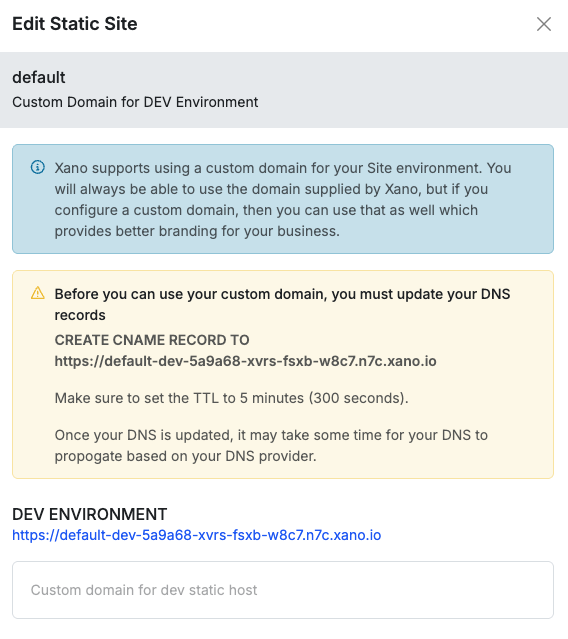
prod and dev environments. The Xano domain will always be available, even if you have a custom domain set.
Click the button in when reviewing your site to open the settings panel.
From there, you can click the domain button to add a custom domain for either environment.
Xano will present you with instructions on how to set up your DNS records to point to Xano’s servers.