

 Xano
XanoThe Issue
If you have an input or variable in your logic that shares the name of a database column you’re targeting with Add Record, Edit Record, or Add/Edit Record, that column’s data can be overwritten, even if it’s hidden in the function.- This behavior is triggered any time XanoScript is saved, either via the UI editor, Agent Mode, or pushing changes via the CLI and Metadata API.
- The XanoScript code shows no change before and after, and the issue is invisible in both version history and Run & Debug.
Previous Workarounds
- Show/hide the field in the visual UI, and re-save, which fixes it temporarily until the XanoScript is saved again.
- Renaming the inputs or variables to not match a column name
- Using the Patch Record function instead
Who’s impacted?
You may be affected if an existing function was originally built visually, later edited in XanoScript or with AI, and includes an input or variable whose name matches a column used by an Add, Edit, or Add/Edit Record statement. Functions created entirely in XanoScript are generally not affected.What’s the fix?
For functions impacted by this that you aren’t already addressing in other ways, you can use the new Enforce Hidden Fields option. This can be enabled by either checking the box in the function panel, or by addingenforce_hidden_fields = true to the function’s XanoScript, and saving your changes.
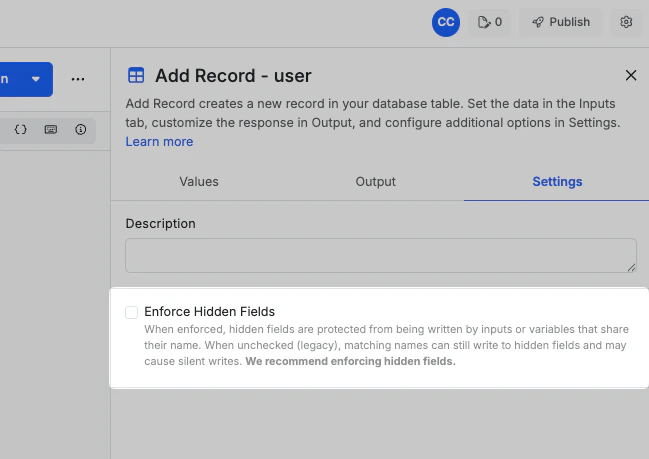
enforce_hidden_fields behavior.
Example Behaviors
Impacted functions
Using these example inputs:name
name and email fields, and hiding the email field in the function, with the goal of that value not being written, email will be overwritten with whatever value is supplied in the email input.
Impacted functions after enabling enforce_hidden_fields
Using these example inputs:
name
name and email fields, and hiding the email field in the function, with the goal of that value not being written, email will be written with the default value specified in the table, with no value, or with a null value if the field is nullable.