

 Xano
XanoInstance Down Alerting
Xano automatically monitors your instance for potential issues. When a problem is detected that may be causing downtime, instance admins receive an email alert with guidance on next steps, including:- Perform a hard restart — Clear any processes that may be stuck in a crash loop via Server Maintenance.
- Add database storage — If the interruption may be related to database capacity, add additional database storage as an add-on to your plan.
- Upgrade CPU capacity — If you suspect you were reaching CPU capacity, upgrading your plan can boost performance and help stabilize your application.
Instance Down alerts are sent automatically to instance admins — no configuration is required. If you receive one of these alerts, follow the recommended steps or reach out to support@xano.com for assistance.
Check the Xano Status Page
Visit the status page to see if there are any ongoing incidents or maintenance windows that might be affecting the Xano platform.Xano Status Page
Paid Xano instances have dedicated resources, which means issues impacting Xano as a whole are not likely to affect your instance.
Check Instance Access
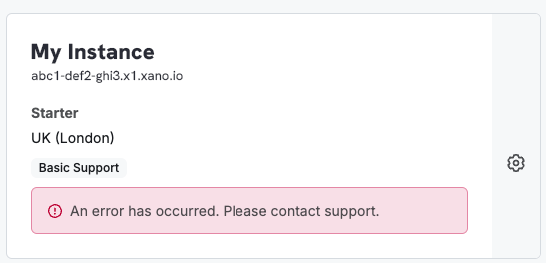
- Instance selection screen shows ‘An error has occurred’
- Unable to access instance via normal URL
Perform Instance Maintenance
From the instance selection screen, click on the next to your instance and select ‘Maintenance’. Select ‘Server Maintenance” and take note of any items that list a status other than ‘RUNNING’. If you see any that are labeled otherwise, select them to restart the service. After restarting, wait a few minutes and then try accessing your instance again. Symptoms:- APIs not responding or timing out
- Unable to access instance
Check your Database
If you are out of database storage, this can cause downtime. From the instance selection screen, click on the next to your instance and select ‘Maintenance’. Then select ‘Database Maintenance’ to see your current storage usage. If you are close to or have exceeded your storage limit, you’ll need to add more storage from your billing settings. You may also be able to quickly free up database storage by clearing your request history. From the maintenance panel, choose Database Storage, and select ‘Clear History’ at the bottom of the panel. Symptoms:- APIs not responding or timing out
- APIs responding slowly
- When attempting to make changes to the database, you receive an error indicating disk full or out of space
- When trying to access your instance, you are not met with an error and taken back to the instance selection screen
Check Async Functions and Triggers
If there is a large queue of asynchronous functions or triggers, this can cause performance issues, or in extreme cases, downtime. From the instance selection screen, click on the next to your instance and select ‘Maintenance’. Then select ‘Async Functions’ or ‘Triggers’ to see if there is a large queue. If there is, you may need to clear the queue by selecting the appropriate option in the panel. Symptoms:- Xano UI is slow or unresponsive
- APIs responding slowly
- Instance not accessible or slow to respond